
MODS Network
Registered Users: 130,362 Users Online: 96
""gib" is derived from "giblet", which is pronounced with a j sound. - John Carmack, id Software" *

Latest News:

Login 


Members Online»
0 Active | 96 Guests
Online:
|
LATEST FORUM THREADS»
by Welshy
Posts: 6 / 377 The Future of MODSonline
In The News by KAZAM3766
Posts: 1 / 634 CoD: Battle Royale
CoD+UO Map + Mod Releases by morgawr
Posts: 1 / 2701 Damaged .pk3's
CoD Mapping by lazygit
Posts: 1 / 3214 heli to attack ai
CoD4 SP Mapping by DrBiggzz
Posts: 11 / 1027 New Cod UO Rifle Mod.
CoD Mapping |
Polls»
|
-- see more --


Prometheus shows you how to create a New Weapon for Call of Duty using LightRay3D
Creating a new weapon
------------------------------------------
You'll need the LR3D plugin and COD tools installed before you can create models for COD.
*I'll use the m1carbine that's included in the COD tools for this example.
1) Create your model's folder in callofduty/tools/model_export/(eg callofduty/tools/model_export/mycarbine/)
(Textures and *.xmodel_export file should be saved in there).
NOTE: files that will be created in xmodelsurfs and xmodelparts folders will be named after this folder.
If you don't store your *.xmodel_export file in a descriptive folder the converted files will have a numeric filename instead(eg 1 or 2) 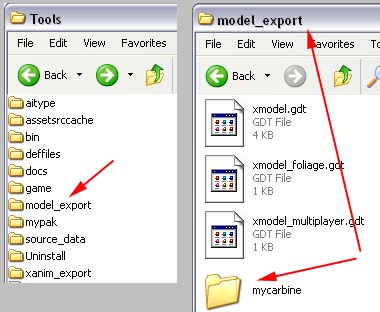
2) Exporting the model
Import m1carbine.xmodel_export in LR3D(don't import the animation, just the model).
IMPORTANT:
Do NOT include the player arms when exporting a weapon and vice versa.
You can check xmodel/ folder and see the different files for arms and weapons named(respectively):
viewmodel_???weaponname and viewmodel_hands_???.
Unless feature versions of the plugin takes care of files that contain both arms and weapon you should delete either the arms or weapon when
exporting.
Delete player arms and bones.
Export the model as
callofduty/tools/model_export/mycarbine/mym1carbine.xmodel_export)
NOTE: Put the textures in this folder too.Remember to add metal@ prefix to the texture filename. 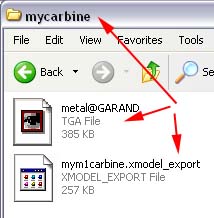
THE ASSET MANAGER: A front-end editor.You also can manually open and edit some of the files using NotePad.
3) Run the asset manager and create a game data file( *.gdt) or open an existing one.
NOTE: Each gdt file can hold information ab
out a lot of different types of assets (eg models, animations, weapons, characters etc.).
You can have a gdt file for your whole MOD. 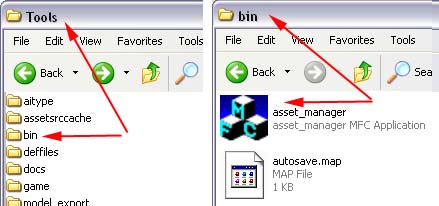
a) Create the
Select "xmodel" from the list below and press "new entry".
Type the name you want(eg "weapon_MyM1Carbine").
ALWAYS add a "weapon_" prefix. 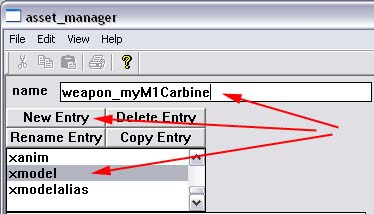
Some options will be shown on the right side of the window.
In the
Browse and select the xmodel_export file.
NOTE: LOD(level of detail) meshes are low-poly versions of the normal model.
They are used when model is too far away(given distance you specify) in order to increase performance(less polygons drawn).
You can use PolyChop modifier to create and export medium,low versions of the model. 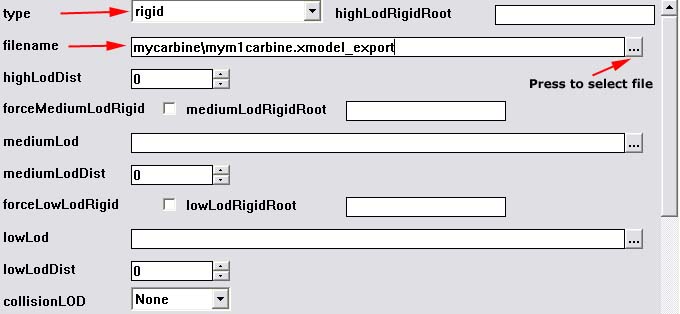
You don't have to fill any other fields, the model will work fine at this point.
Save the gdt file as
b) Create the
Now, add a new entry and name it
Set "viewmodel" instead of "rigid" and select the same filename(you may have 2 different versions for static and viewmodel models). 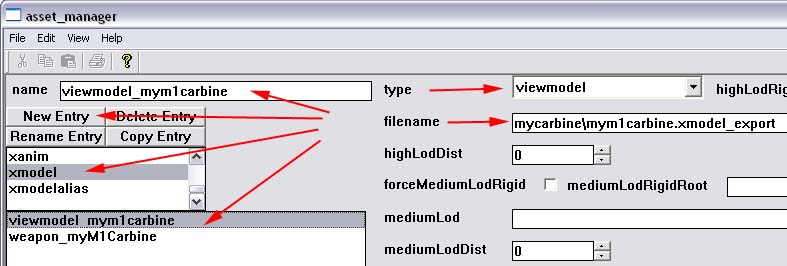
Save the gdt file.
4) Run the converter to create the in-game files(tools/bin/converter.exe)
If something is wrong, converter will output an error message.
Make sure your model meshes have a material assigned and the textures are placed in the same folder where your *.xmodel_export file exists. 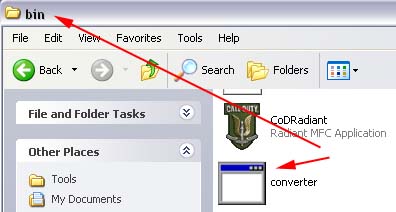
The resulting files will be placed in the following folders:
tools/game/main/xmodel (model file, contains info about bones,meshes files and textures)
tools/game/main/xmodelparts (bones)
tools/game/main/xmodelsurfs (meshes)
5) Create the weapon entity
Last, you must create a
If you have closed Asset Manager, reopen and load your gdt file.
Select
Set "1:Single-Player" or "2:Multi-Player" for mp to targetFolder(you can use same model files).
(The folders are tools/game/main/weapons/sp and tools/game/main/weapons/mp)
Set the displayName of the weapon (eg MyM1Carbine)-displayed in game.
Adjust other options eg weaponClass: Rifle, damage, weaponSlot:Primary etc. 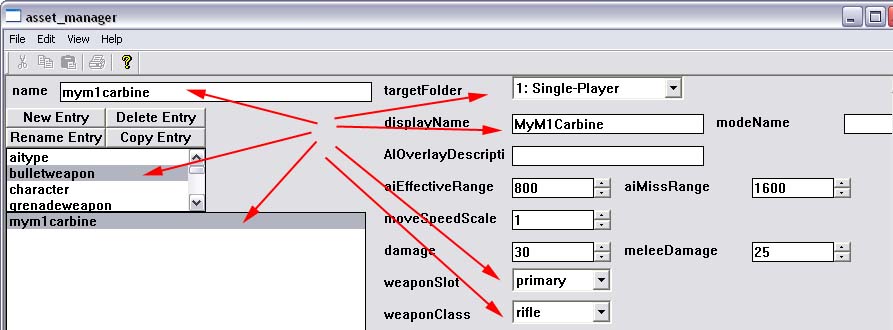
Scroll down and find radiantName.Set a name for radiant(eg mym1carbine). 
Scroll down more and set the model filenames we just converted.
World model is the static(pickable) model, gunModel is the viewmodel and handModel the player arms. 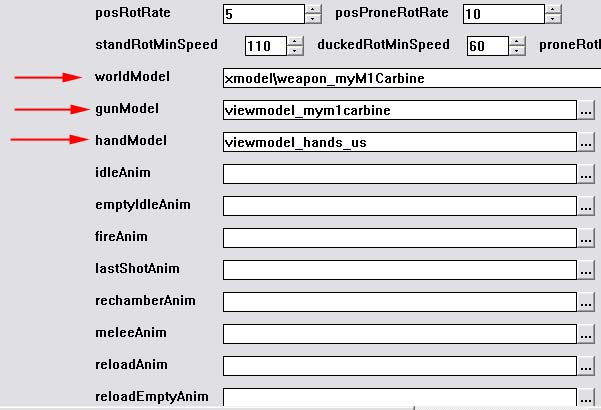
That's the basic adjustments.You can alter,set any other options you want.
Save the gdt file.
You can close the asse manager now.
- Run the converter.exe again to compile the weapon entity -
The resulting file will be saved in tools/game/main/weapons/sp or mp for multi-player.
You can open and edit this file with NotePad.
6) Create your pk3 and add folders/files.
skins/ texture file(s)
xmodel/ the file created in callofduty/tools/game/main/xmodel/
xmodelsurfs/ the file created in callofduty/tools/game/main/xmodelsurfs/
xmodelparts/ the file created in callof
duty/tools/game/main/xmodelparts/
weapons/sp/ the file created in callofduty/tools/game/weapons/sp/
AND/OR(multi-player): weapons/mp/ the file created in callofduty/tools/game/weapons/mp/
You will find the files by the "mym1" prefix.
7) Put the pak in callofduty/main/ folder and run Radiant.
Press right mouse button in the viewport and select weapons/mym1carbine.
This tutorial was originally posted by Prometheus at LightRay3D
You can get LightRay3D here
Latest Syndicated News»
Comments: 5
Codutility.com up and runn...
Nice, and there still using the logo and template for the screenshots, which... Comments: 5
Codutility.com up and runn...
dundy writes...Quote:Call of Duty modding and mapping is barly alive only a ... Comments: 5
Codutility.com up and runn...
Mystic writes...Quote:It seems to me the like the site is completely dead?
... Comments: 5
Codutility.com up and runn...
It seems to me the like the site is completely dead? Comments: 5
Codutility.com up and runn...
Yeeaahhhh.........
|
Latest Downloads»
OHMY Don Quixote
Call of Duty 2: Maps: Multiplayer (5.76Mb) OHMY Neuburg
Call of Duty 2: Maps: Multiplayer (6.84Mb) OHMY Tebessa
Call of Duty 2: Maps: Multiplayer (7.36Mb) OHMY POW Camp
Call of Duty 2: Maps: Multiplayer (2.15Mb) OHMY Valley
Call of Duty 2: Maps: Multiplayer (5.7Mb) |

Partners & Friends»
|


Site Links and Information
|
Partners
|
Friends
|
Copyright © MODSonline LLC
Tresware Content Management System © 2011
Website Designed by LKFX and Developed by Tresware